
FLUX LoRA Game Asset Prompts: RPG Design Guide
Epic split composition showing a glowing magical broadsword, circular character token, and bold 3D 'RPG ASSETS' text overlay against a dark runic dungeon backdr
On this page 8 sections
Key takeaways
To generate clean RPG/TTRPG game assets using FLUX.2, structure your prompts with a descriptive style hierarchy, apply specific LoRA weights (0.80–0.90), and use high-contrast solid backgrounds to enable instant, pixel-perfect transparency.
Learn how to structure FLUX LoRA game asset prompts to generate clean, slice-ready isometric tiles, character tokens, and item icons.
Master FLUX LoRA Game Asset Prompts for Fantasy RPGs
Creating high-quality digital assets for independent games used to take days of manual texturing and editing. With the release of FLUX.2, developers can now use structured flux lora game asset prompts to output consistent isometric tiles, circular character tokens, and item icons on demand. While base models tend to produce realistic images, applying custom LoRAs balances style and readability.
The Blueprint for FLUX LoRA Game Asset Prompts
Getting consistent perspective requires a strict prompt structure. FLUX.2 is highly responsive to natural English descriptions rather than messy tag clouds. The blueprint relies on four core segments: Asset Type & Camera Frame, Subject & Core Attributes, Aesthetic & Art Style Triggers, and Isolation Parameters.
Designers need assets. They save time. This guide shows how. We start now.
Here is the parameter and settings matrix for the three main asset types.
| Asset Type | Recommended LoRA Weight | Trigger Words | Target Aspect Ratio | Background Strategy |
|---|---|---|---|---|
| Isometric Tiles | 0.80 - 0.85 |
iso_tile |
1:1 |
Solid black (removes block shadows easily) |
| RPG Tokens | 0.90 |
token_art |
1:1 |
Solid dark gray (prevents token glow bleed) |
| Item Icons | 0.80 |
item_icon |
1:1 |
Solid dark background (enhances glowing effects) |
10 Copy-Paste FLUX.2 Prompts
Isometric Environment Tiles
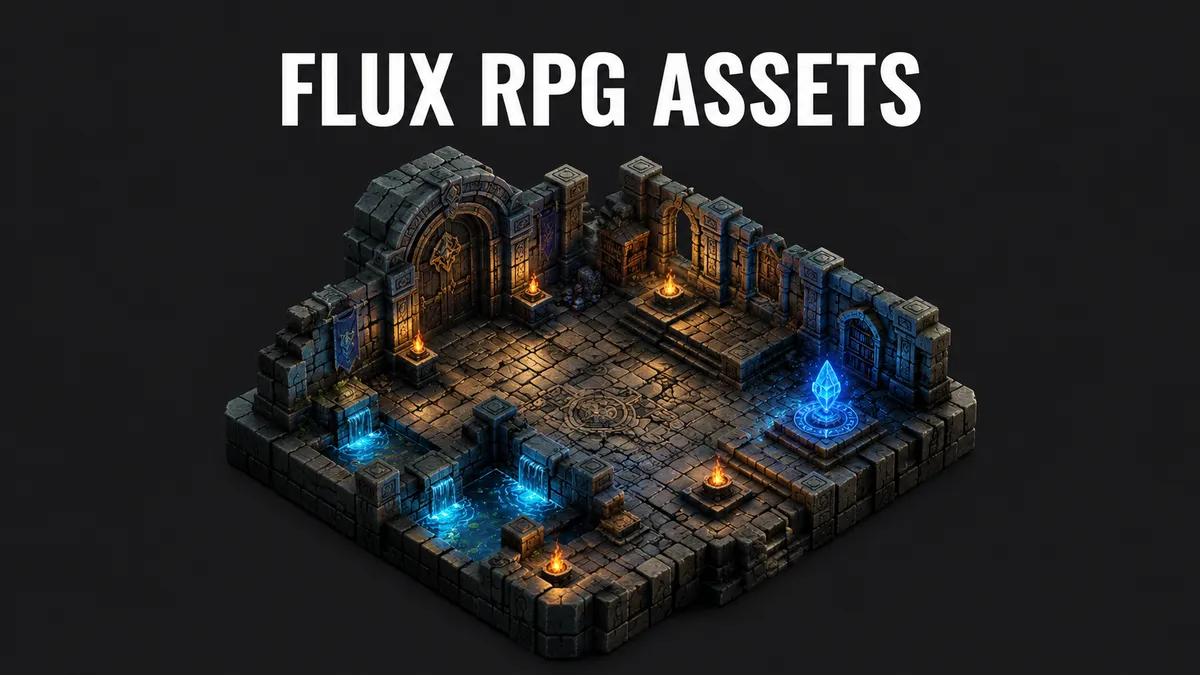
Generate stylized 2.5D terrain blocks with flat tops to build modular levels.
> Isometric 2.5D game tile, lush green grass block with small purple wildflowers, stylized fantasy hand-painted texture, flat top, isolated on a solid black background. <lora:flux_isometric_tiles:0.8> trigger: iso_tile
> Isometric 2.5D game tile, dark cracked stone brick floor with glowing blue runes carved, ancient dungeon style, flat top, isolated on a solid black background. <lora:flux_isometric_tiles:0.85> trigger: iso_tile
> Isometric 2.5D game tile, sandy beach edge transitioning into clear turquoise water with gentle waves, fantasy RPG style, flat top, isolated on a solid black background. <lora:flux_isometric_tiles:0.8> trigger: iso_tile
> Isometric 2.5D game tile, medieval cobblestone path with small moss tufts in the cracks, rustic fantasy style, flat top, isolated on a solid black background. <lora:flux_isometric_tiles:0.8> trigger: iso_tile
Tabletop RPG Character Tokens
Create circular tokens with gold, silver, or copper borders for virtual tabletop character sheets.
> Circular tabletop RPG game token, portrait of a bearded dwarf warrior with an iron helm and fierce expression, stylized fantasy character art, clean circular golden border, centered, isolated on a solid dark gray background. <lora:rpg_token_generator:0.9> trigger: token_art
> Circular tabletop RPG game token, portrait of a serene elven mage with glowing green eyes and silver hair, holding a staff, stylized fantasy character art, clean circular silver border, centered, isolated on a solid dark gray background. <lora:rpg_token_generator:0.9> trigger: token_art
> Circular tabletop RPG game token, portrait of a scarred orc rogue wearing a dark leather cowl, smirking, stylized fantasy character art, clean circular copper border, centered, isolated on a solid dark gray background. <lora:rpg_token_generator:0.9> trigger: token_art
High-Fidelity RPG Item Icons
Render detailed inventory items, weapons, and magic consumables against dark backgrounds.
> High-fidelity game item icon, a glowing glass bottle filled with bubbling red liquid, cork stopper, gold filigree, fantasy RPG asset, dark background, detailed reflections, centered. <lora:rpg_items_detail:0.8> trigger: item_icon
> High-fidelity game item icon, an ornate broadsword with ice shards floating around the frosty blue blade, magic weapon, fantasy RPG asset, dark background, detailed reflections, centered. <lora:rpg_items_detail:0.8> trigger: item_icon
> High-fidelity game item icon, an ancient leather-bound spellbook with a bronze clasp and glowing purple arcane symbols on the cover, fantasy RPG asset, dark background, centered. <lora:rpg_items_detail:0.8> trigger: item_icon
Accessing More Resources
For designers who need additional assets like custom buttons or menus, check out the curated selection in our UI Design Category or browse through the resources in the Asset Vault Category to speed up your workflow.
“Light is the single most important element in any image. Master light, and you master AI art.”
— topimageprompt Team
Frequently asked questions
### How do you use LoRAs with FLUX.2 for game assets?
### How do you get clean, transparent backgrounds for RPG assets in FLUX.2?
### What is the best prompt structure for generating consistent isometric tiles in FLUX.2?
Sources and further reading
- Black Forest Labs FLUX.1/FLUX.2 Model Release Notes (Hugging Face Model Card); ComfyUI LoRA Documentation; TTRPG Digital Asset Standards.