Ideogram 4.0 JSON Layout Prompting: The Bounding Box Masterclass
Learn the Ideogram 4.0 JSON prompt schema with bounding boxes, color palettes, and literal text fields, plus three copy-ready prompts you can test today.
On this page 10 sections
Key takeaways
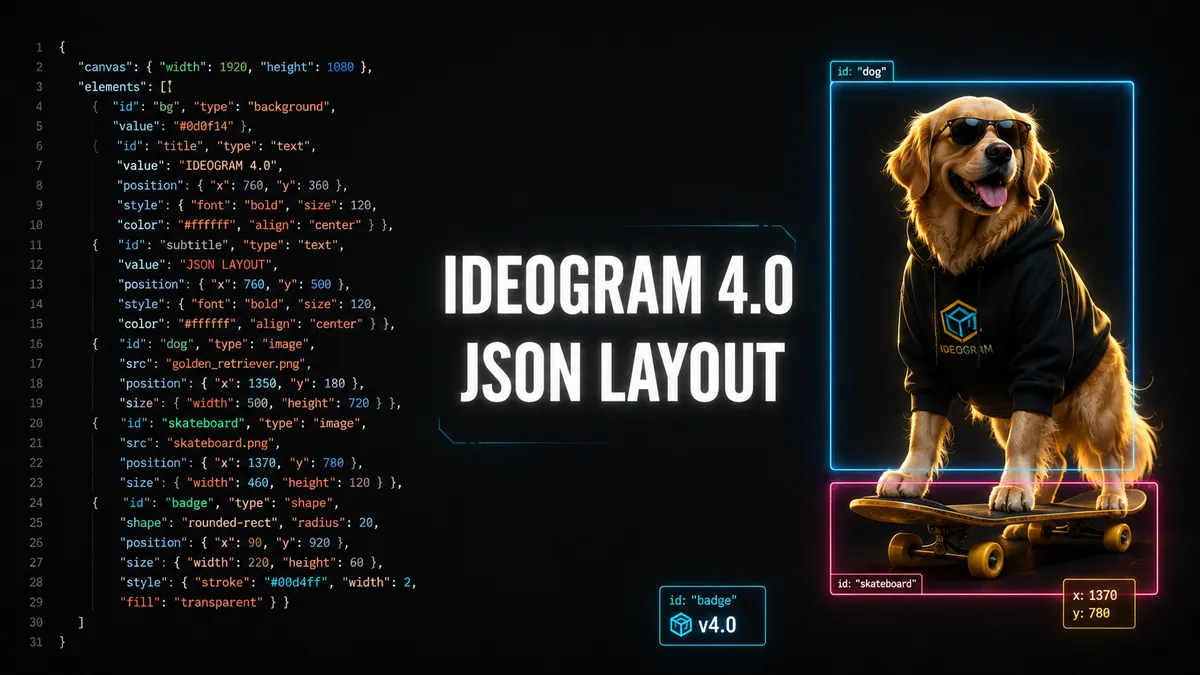
Ideogram 4.0 is a 9.3 billion parameter open-weight text-to-image model released June 3, 2026. It was trained exclusively on structured JSON captions with bounding boxes, per-element color palettes, and literal text fields. The schema uses three top-level fields: `high_level_description`, `style_description`, and the required `compositional_deconstruction`. Bounding boxes use a normalized 0 to 1000 coordinate grid. You can control up to 16 global hex colors and 5 per-element colors. Plain text still works, but JSON gives far better layout, color, and text control.
Ideogram 4.0 ships on June 3, 2026 as a 9.3B open-weight model trained on structured JSON captions. This Masterclass breaks down the full schema and shows three copy-ready prompts.
Ideogram 4.0 JSON Layout Prompting: The Bounding Box Masterclass
Ideogram 4.0 shipped on June 3, 2026 as a 9.3 billion parameter open-weight model, and it does something no other open image model does. It reads structured JSON prompts with explicit bounding boxes, per-element color palettes, and literal text fields, then validates every prompt against a schema before it generates a single pixel.
That means you can tell the model exactly where to place a headline, what hex color to paint it, and what words to render, all inside one prompt. Plain text still works. But if you want pixel-level layout control, JSON is the language Ideogram 4.0 was trained on, and it rewards you for speaking it natively.
This Masterclass shows you the full schema, the key order rules, and three copy-ready prompts you can test today.
Why JSON Beats Plain Text on Ideogram 4.0
Most image models guess your layout from a sentence. Ideogram 4.0 skips the guessing because it was trained exclusively on structured JSON captions. The official GitHub prompting guide states that JSON gives significantly better results for controllability, spatial layout, and style fidelity. When you hand the model a schema-valid JSON object, you lock down the subject, the style, the colors, and the position of every element before generation starts.
The tradeoff is discipline. The model expects keys in a specific order. It expects bounding box coordinates in a normalized 0 to 1000 grid. It expects hex colors in uppercase. Break the rules and the pipeline throws validation warnings, and your output quality drops. Follow the rules and you get design-grade control that rivals a layout tool.
The Three Top-Level Fields
Every Ideogram 4.0 JSON prompt uses three top-level fields. The first is high_level_description, an optional but strongly recommended one or two sentence summary of the whole image. The second is style_description, an optional object that controls aesthetics, lighting, medium, and color. The third is compositional_deconstruction, a required object that handles spatial layout through background and elements.
Only compositional_deconstruction is mandatory. But skipping the other two leaves quality on the table, because the model uses them to ground the rest of the prompt.
Style Description and the Strict Key Order
The style_description object uses different keys depending on whether you want a photograph or an art style. You pick one of photo or art_style, never both. The key order is strict, and the model was trained on that exact order.
For photographs, the order is aesthetics, lighting, photo, medium, color_palette. For non-photo work like illustrations and 3D renders, the order is aesthetics, lighting, medium, art_style, color_palette. The color_palette field accepts up to 16 uppercase hex color codes and steers the dominant colors of the entire image.
This is where Ideogram 4.0 pulls ahead of every other open-weight model. You hand it five hex codes, and the output respects them. Most models ignore color instructions or blend them loosely. Ideogram 4.0 treats them as hard constraints.
Bounding Boxes and the 0 to 1000 Grid
The compositional_deconstruction object contains two required fields: background and elements. The background field describes the setting. The elements array lists every object and every piece of text in the image, each with an optional bounding box.
Bounding boxes use a normalized 0 to 1000 coordinate grid with the origin at the top-left corner. The format is [y_min, x_min, y_max, x_max]. A box of [200, 300, 800, 900] means the element starts 20 percent down from the top, 30 percent in from the left, and ends 80 percent down and 90 percent across. This grid is resolution-independent, so the same prompt works at 512 pixels or native 2K.
Each element has a type of either "obj" for objects and subjects, or "text" for in-image text. Text elements carry a literal text field, and the model renders those exact characters into the image. This is how you place a headline, a logo, or a label with precise wording and precise placement.
The Key Order Rules You Cannot Break
The model was trained on JSON with a consistent key order, so the pipeline validates key order and warns you when keys appear out of sequence. For "obj" elements, the order is type, bbox, desc, color_palette. For "text" elements, the order is type, bbox, text, desc, color_palette. The bbox and color_palette fields are optional, but if you include them, they must sit in the position shown.
Per-element color palettes accept up to 5 hex colors, separate from the global 16-color palette. This lets you paint one element red and another blue inside the same image, all controlled from the prompt.
The Schema Field Reference
| Field | Required | Purpose | Format |
|---|---|---|---|
high_level_description |
No (recommended) | One or two sentence image summary | String |
style_description |
No | Aesthetics, lighting, medium, color | Object |
compositional_deconstruction |
Yes | Spatial layout and elements | Object |
background |
Yes (inside comp) | Setting description | String |
elements |
Yes (inside comp) | Objects and text with bounding boxes | Array |
bbox |
No | Element placement | [y_min, x_min, y_max, x_max], 0 to 1000 |
color_palette (global) |
No | Image-wide color steering | Up to 16 uppercase hex |
color_palette (per element) |
No | Element-level color | Up to 5 uppercase hex |
text |
Yes for text type | Literal in-image text | String |
Three Copy-Ready JSON Prompts
Here are three prompts you can paste into Ideogram 4.0 today, each showing a different capability.
Photoreal with color control. A golden retriever on a skateboard, with a warm palette locked in:
{
  "high_level_description": "A golden retriever riding a skateboard down a sunny sidewalk.",
  "style_description": {
    "aesthetics": "warm, playful, vibrant",
    "lighting": "bright midday sun, soft shadows",
    "photo": "action photograph, shallow depth of field",
    "medium": "photograph",
    "color_palette": ["#F5C542", "#87CEEB", "#4A4A4A", "#FFFFFF", "#2E8B57"]
  },
  "compositional_deconstruction": {
    "background": "A sunny suburban sidewalk with green grass and a blue sky.",
    "elements": [
      {"type": "obj", "bbox": [200, 300, 800, 900], "desc": "A golden retriever with a fluffy coat, standing on a skateboard, tongue out, ears flapping."},
      {"type": "obj", "bbox": [250, 750, 750, 950], "desc": "A worn red skateboard with black wheels rolling along the concrete."}
    ]
  }
}
In-image text with placement. A business card with literal text rendered exactly:
{
  "high_level_description": "A clean, modern business card layout for a tech company.",
  "style_description": {
    "aesthetics": "minimal, professional, geometric",
    "lighting": "soft studio light, no harsh shadows",
    "medium": "graphic design",
    "art_style": "flat vector design, generous whitespace, sans-serif typography",
    "color_palette": ["#FFFFFF", "#F0F0F0", "#333333", "#0066FF", "#00CC88"]
  },
  "compositional_deconstruction": {
    "background": "A white business card with a subtle grey border.",
    "elements": [
      {"type": "text", "bbox": [100, 100, 200, 800], "text": "NOVA LABS", "desc": "Bold blue company name at the top left."},
      {"type": "text", "bbox": [700, 100, 850, 600], "text": "Jane Doe\nFounder & CEO", "desc": "Name and title in dark grey at the bottom left."}
    ]
  }
}
Cinematic poster with text and color. A sunset sailboat poster with a headline:
{
  "high_level_description": "A lone sailboat on calm water at sunset.",
  "style_description": {
    "aesthetics": "serene, warm, golden hour",
    "lighting": "soft directional sunset glow",
    "photo": "cinematic wide shot, film grain",
    "medium": "photograph",
    "color_palette": ["#FF6B35", "#F7C59F", "#004E89", "#1A659E", "#2B2D42"]
  },
  "compositional_deconstruction": {
    "background": "Calm ocean water reflecting a golden sunset sky.",
    "elements": [
      {"type": "obj", "bbox": [400, 350, 600, 650], "desc": "A white sailboat with a single sail, centered on the water."},
      {"type": "text", "bbox": [50, 100, 150, 900], "text": "BEYOND THE HORIZON", "desc": "Large uppercase headline across the top in white sans-serif."}
    ]
  }
}
What Is Coming Next
Ideogram announced two roadmap features that are not live yet but ship in the next 4.0 release. Editable text layers will return headlines, body copy, and graphic elements as separate layers, so your design team can revise typography after generation without rebuilding it. Alpha channels at inference will return transparency directly from the model, which removes the separate background removal step that current workflows require.
Both features double down on the same thesis. Ideogram 4.0 treats image generation as a layout problem, not just a rendering problem, and JSON is how you speak that language.
Frequently asked questions
What is Ideogram 4.0?
Does Ideogram 4.0 require JSON prompts?
How do bounding boxes work?
How many colors can I control?
s Ideogram 4.0 free for commercial use?
Sources and further reading
- 1. Ideogram Team, "Ideogram 4.0 Technical Details: Open model at the forefront of design" (Jun 3, 2026) — confirms 9.3B parameter single-stream DiT, 34 layers, Qwen3-VL-8B text encoder, trained exclusively on structured JSON captions, native 2K resolution, FP8 and NF4 variants, first open-weight model on DesignArena. https://ideogram.ai/blog/ideogram-4.0 【turn1fetch1】 2. ideogram-oss, "ideogram4/docs/prompting.md" (GitHub official repo) — confirms the three top-level fields, strict key order for photo and art_style captions, bounding box format `[y_min, x_min, y_max, x_max]` in 0 to 1000 normalized coordinates, 16 global and 5 per-element color palette limits, uppercase hex requirement, and schema validation. https://github.com/ideogram-oss/ideogram4/blob/main/docs/prompting.md 【turn2find0】【turn2find1】【turn2find2】 3. ImagineArt, "Ideogram 4.0 Prompt Guide: JSON, Color Control, and Text Rendering" — confirms plain text works but JSON gives better layout, typography, and color control. https://www.imagine.art/blogs/ideogram-4-0-prompt-guide 【turn0search1】 4. ImagineArt, "Ideogram 4.0 Overview: Open-Weight Design Model" — confirms editable text layers and alpha channels at inference are on the 4.0 roadmap, and commercial use requires a paid license. https://www.imagine.art/blogs/ideogram-4-0-overview 【turn0search8】