Key instructions to preserve
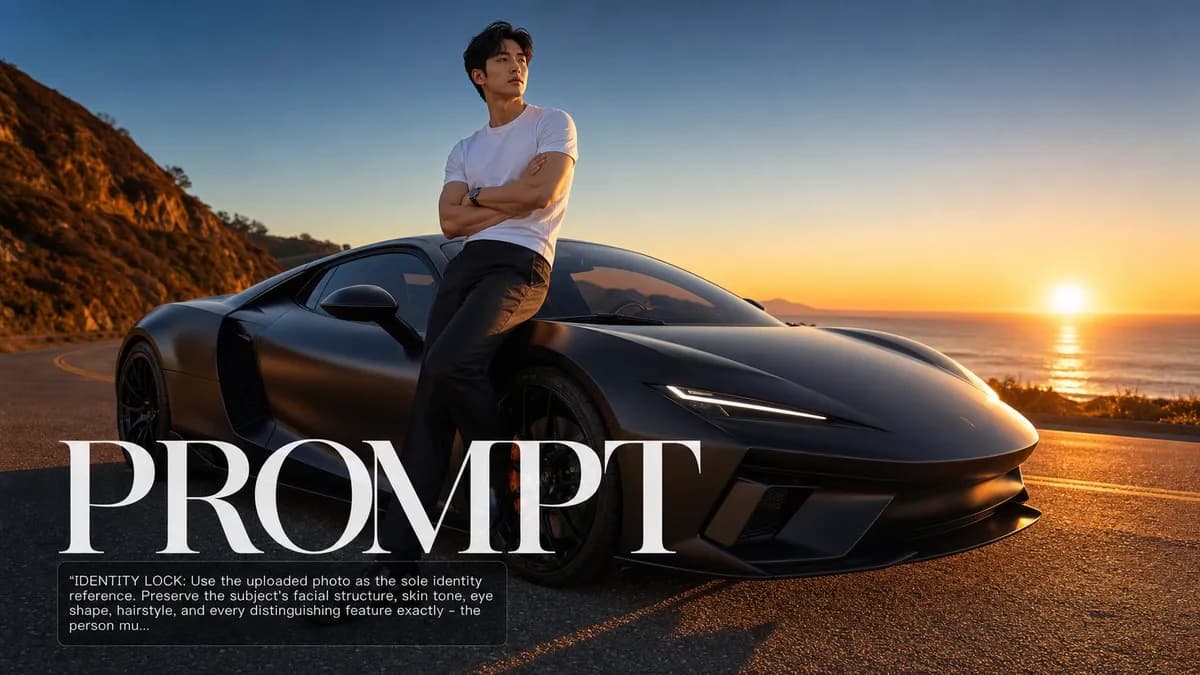
SCENE: Subject leaning against the door of a sleek fictional supercar — matte obsidian black, low silhouette — parked on an empty coastal road at sunrise.
IDENTITY LOCK: Use the uploaded photo as the sole identity reference. Preserve the subject's facial structure, skin tone, eye shape, hairstyle, and every distinguishing feature exactly — the person must remain instantly recognizable. SCENE: Subject leaning against the door of a sleek fictional supercar — matte obsidian black, low silhouette — parked on an empty coastal road at sunrise. The subject is relaxed, arms crossed, one foot slightly raised against the door sill. The car design is clearly high-performance but carries no real manufacturer badge. The horizon is thin amber, the sky above still deep blue — first light. PHYSICS & CRAFT: Low sunrise sun from camera-right at 5-10° above the horizon creates long warm raking light across both subject and car body. The car's matte surface shows no specular highlight but does absorb color from the warm ambient sky and bounces it softly onto the subject's face from below. The road surface catches a thin specular horizon reflection. A subtle rim light from sunrise wraps around the subject's near shoulder and the car's B-pillar. TECHNICAL EXECUTION: Automotive advertising photography style, 50mm lens, f/4, medium depth of field keeping both subject and car front-end sharp, Kodak Vision3 500T cinema film grade — deep controlled blacks, warm sunrise palette, slight halation glow on highlight edges. HARD CONSTRAINTS: No real car brand badges — the car should be clearly fictional. Do not change the subject's clothing — their look against the car tells the story. Do not add a helmet, racing suit, or driving gloves unless already present in the original photo.

0 people have copied this prompt
Sunlit Supercar Campaign Shot is a branding prompt for GPT Image 2, composed for a 16:9 image. SCENE: Subject leaning against the door of a sleek fictional supercar — matte obsidian black, low silhouette — parked on an empty coastal road at sunrise.
SCENE: Subject leaning against the door of a sleek fictional supercar — matte obsidian black, low silhouette — parked on an empty coastal road at sunrise.
Keep the prompt structure, then replace the main subject, action, or environment in "SCENE: Subject leaning against the door of a sleek fictional supercar — matte obsidian black, low silhouette — parked on an empty coastal road at sunr...".
Adjust one visual signal at a time, such as "50mm", "f/4", "rim light", "supercar campaign photo prompt", so you can identify which instruction changes the result.
Use the wide frame to establish the environment, place supporting details around the subject, and maintain a clear focal point.
Use one clear reference image and retain the identity-lock instructions when changing clothing, lighting, background, or camera direction.
Use direct natural-language edits after the first generation. State what must remain unchanged before describing the single element you want to revise.
Judge the result by how clearly it communicates the intended branding direction while keeping the subject, environment, and visual treatment consistent.
Three simple steps to generate your AI image.
Click the "Copy Full Prompt" button above to copy the entire prompt text to your clipboard instantly.
Open your preferred image generator and paste the prompt into the text input. You're ready to create.
Hit generate and watch the magic happen. Tweak the prompt parameters to make it your own.