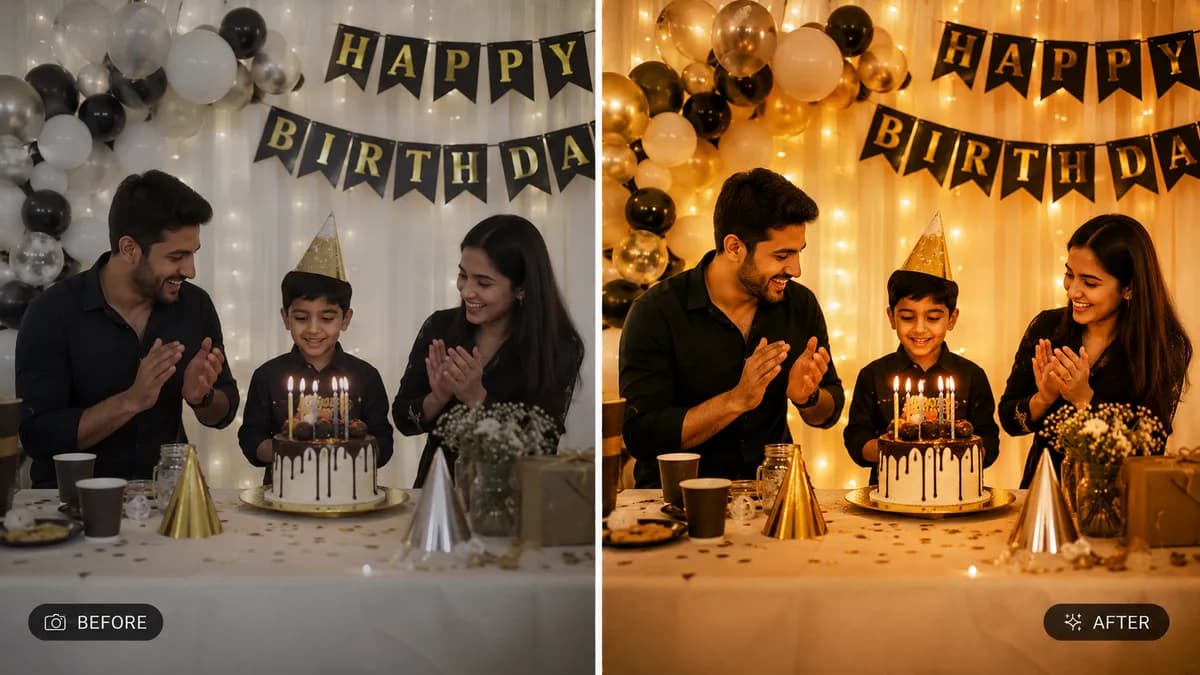
Editable📸 INPUT REFERENCE: Use the uploaded wedding or event photo as
the base — preserve the exact subjects, poses, expressions,
venue details, decor and composition precisely as they appear
in the original
🎨 COLOR GRADING TASK: Apply a professional cinematic color
grade to the photo, in the style specified by the user (e.g.
"warm golden romantic tone," "soft pastel airy tone," "moody
deep editorial tone," "classic timeless film tone"). Adjust
overall color mood while preserving accurate skin tones
🌅 TONE & MOOD ENHANCEMENT: Adjust highlights, midtones and
shadows separately to create cinematic depth — lifted shadows
with a subtle color tint, balanced midtones, and softly rolled-off
highlights consistent with professional wedding/event photography
color grading trends
💍 SKIN TONE PROTECTION: Ensure all skin tones across every
subject in the photo remain natural and accurate regardless of
the overall color grade applied — color grading should enhance
mood without making anyone look unnaturally tinted
🌸 DECOR & DETAIL ENHANCEMENT: Enhance the natural color vibrancy
of flowers, fabric, lighting decor and venue details to feel
rich and intentional, supporting the overall mood without looking
oversaturated
💡 LIGHTING CONSISTENCY: Maintain the original lighting direction
and shadow placement — only color tone and mood shift, not the
physical light sources in the scene
🖌️ STYLE: Photorealistic cinematic color grading — final result
must look like it was graded by a professional wedding
photographer/cinematographer, never an oversaturated Instagram
filter
🚫 CONTENT PRESERVATION: Never alter people, poses, expressions,
or composition — only color grade and tonal mood change
📐 ASPECT RATIO: Preserve the original photo's exact aspect
ratio and framing