15 AI Real Estate Photo Editing Prompts for Listings and Virtual Staging (2026)
Copy 15 AI real-estate photo prompts for decluttering, lighting, sky replacement, day-to-dusk, and virtual staging without moving walls or fixtures.
On this page 34 sections
Key takeaways
Lock every permanent feature and the original perspective before requesting an edit. Separate truthful enhancement from virtual staging, retain the original image, and disclose furniture additions or material visualizations according to your MLS and local rules. Never remove defects or alter the property’s actual condition.
Copy 15 AI real-estate photo prompts for decluttering, lighting, sky replacement, day-to-dusk, and virtual staging without moving walls or fixtures.
AI real estate photo editing prompts should begin with the real production decision, not a pile of style adjectives. This guide is written for real-estate agents, photographers, property managers, stagers, and sellers. The 15 templates below are designed to improve or stage listing photos while keeping the property truthful and structurally unchanged.
> Direct answer: Begin with level wide-angle listing photos with visible corners, windows, doors, floors, and fixed fixtures. Define the single decision this image must communicate, explicitly protect all walls, windows, doors, ceilings, floors, built-ins, fixtures, views, room dimensions, camera position, lens perspective, and permanent property condition, and judge the result against the source before it is published or used commercially.
TL;DR
Lock every permanent feature and the original perspective before requesting an edit. Separate truthful enhancement from virtual staging, retain the original image, and disclose furniture additions or material visualizations according to your MLS and local rules. Never remove defects or alter the property’s actual condition.
Why AI real estate photo editing prompts need a dedicated workflow in 2026
For AI real estate photo editing prompts, a visually attractive output can still be unusable when the system changes facts the viewer assumes are real. The critical risk in this topic is not simply a weak aesthetic; it is losing all walls, windows, doors, ceilings, floors, built-ins, fixtures, views, room dimensions, camera position, lens perspective, and permanent property condition. A useful brief therefore separates the requested creative change from the evidence that must survive unchanged.
Current tools can follow natural-language edits and references, yet their own documentation still treats generation as iterative. For this task, that means planning around correct furniture scale, consistent vanishing points, realistic floor contact, plausible daylight, and disclosed staging that does not hide defects. When a pixel, measurement, spelling, logo, or regulated statement must be exact, finish that element with a conventional editing, layout, vector, or measurement tool.
A five-part formula for AI real estate photo editing prompts
Build each request in this order:
- Source for this task: state that you are providing level wide-angle listing photos with visible corners, windows, doors, floors, and fixed fixtures.
- Useful outcome: describe how the result will help real-estate agents, photographers, property managers, stagers, and sellers.
- Truth locks: copy the non-negotiable list—all walls, windows, doors, ceilings, floors, built-ins, fixtures, views, room dimensions, camera position, lens perspective, and permanent property condition.
- Visual behavior: require correct furniture scale, consistent vanishing points, realistic floor contact, plausible daylight, and disclosed staging that does not hide defects.
- Final delivery: name the crop, safe areas, variation count, exclusions, and real publishing context.
This order makes omissions visible. If a requested detail is absent from the source and the brief, the generator must guess; in AI real estate photo editing prompts, that guess can quietly become the most noticeable part of the image.
AI real estate photo editing prompts preflight
Before opening a generator, collect and verify:
- level wide-angle listing photos with visible corners, windows, doors, floors, and fixed fixtures;
- permission for every supplied likeness, product, artwork, room, or private location;
- the exact facts the viewer could reasonably interpret as true;
- the final aspect ratio and smallest display size;
- one primary visual decision for the first pass;
- a side-by-side review method for all walls, windows, doors, ceilings, floors, built-ins, fixtures, views, room dimensions, camera position, lens perspective, and permanent property condition; and
- a non-generative fallback for precision typography, vectors, dimensions, or compliance details.
15 copy-ready AI real estate photo editing prompts
1. Declutter loose personal items
Use the supplied reference image for this AI real estate photo editing prompts task.

GOAL:
Remove only named movable clutter while preserving furniture, room condition, surfaces, fixtures, shadows, and architecture.

PRESERVE / REQUIRE:
- all walls, windows, doors, ceilings, floors, built-ins, fixtures, views, room dimensions, camera position, lens perspective, and permanent property condition
- correct furniture scale, consistent vanishing points, realistic floor contact, plausible daylight, and disclosed staging that does not hide defects
- the requested composition, original aspect ratio when editing, and no unrequested objects

Return one polished declutter loose personal items variation. Exclude watermarks, fake signatures, fabricated claims, and unreadable decorative text.
2. Correct vertical lines
Use the supplied reference image for this AI real estate photo editing prompts task.

GOAL:
Correct lens perspective so vertical walls and door frames appear straight without widening the room or changing dimensions.

PRESERVE / REQUIRE:
- all walls, windows, doors, ceilings, floors, built-ins, fixtures, views, room dimensions, camera position, lens perspective, and permanent property condition
- correct furniture scale, consistent vanishing points, realistic floor contact, plausible daylight, and disclosed staging that does not hide defects
- the requested composition, original aspect ratio when editing, and no unrequested objects

Return one polished correct vertical lines variation. Exclude watermarks, fake signatures, fabricated claims, and unreadable decorative text.
3. Balance interior exposure
Use the supplied reference image for this AI real estate photo editing prompts task.

GOAL:
Lift dark interior tones and control bright windows while retaining a natural believable dynamic range.

PRESERVE / REQUIRE:
- all walls, windows, doors, ceilings, floors, built-ins, fixtures, views, room dimensions, camera position, lens perspective, and permanent property condition
- correct furniture scale, consistent vanishing points, realistic floor contact, plausible daylight, and disclosed staging that does not hide defects
- the requested composition, original aspect ratio when editing, and no unrequested objects

Return one polished balance interior exposure variation. Exclude watermarks, fake signatures, fabricated claims, and unreadable decorative text.
4. Replace a gray sky
Use the supplied reference image for this AI real estate photo editing prompts task.

GOAL:
Replace only the visible sky with a realistic blue or lightly clouded sky while preserving trees, roof edges, reflections, and property light.

PRESERVE / REQUIRE:
- all walls, windows, doors, ceilings, floors, built-ins, fixtures, views, room dimensions, camera position, lens perspective, and permanent property condition
- correct furniture scale, consistent vanishing points, realistic floor contact, plausible daylight, and disclosed staging that does not hide defects
- the requested composition, original aspect ratio when editing, and no unrequested objects

Return one polished replace a gray sky variation. Exclude watermarks, fake signatures, fabricated claims, and unreadable decorative text.
5. Day-to-dusk exterior
Use the supplied reference image for this AI real estate photo editing prompts task.

GOAL:
Shift only ambient time to early dusk, illuminate fixtures that physically exist, and preserve building, landscaping, street, and neighboring context.

PRESERVE / REQUIRE:
- all walls, windows, doors, ceilings, floors, built-ins, fixtures, views, room dimensions, camera position, lens perspective, and permanent property condition
- correct furniture scale, consistent vanishing points, realistic floor contact, plausible daylight, and disclosed staging that does not hide defects
- the requested composition, original aspect ratio when editing, and no unrequested objects

Return one polished day-to-dusk exterior variation. Exclude watermarks, fake signatures, fabricated claims, and unreadable decorative text.
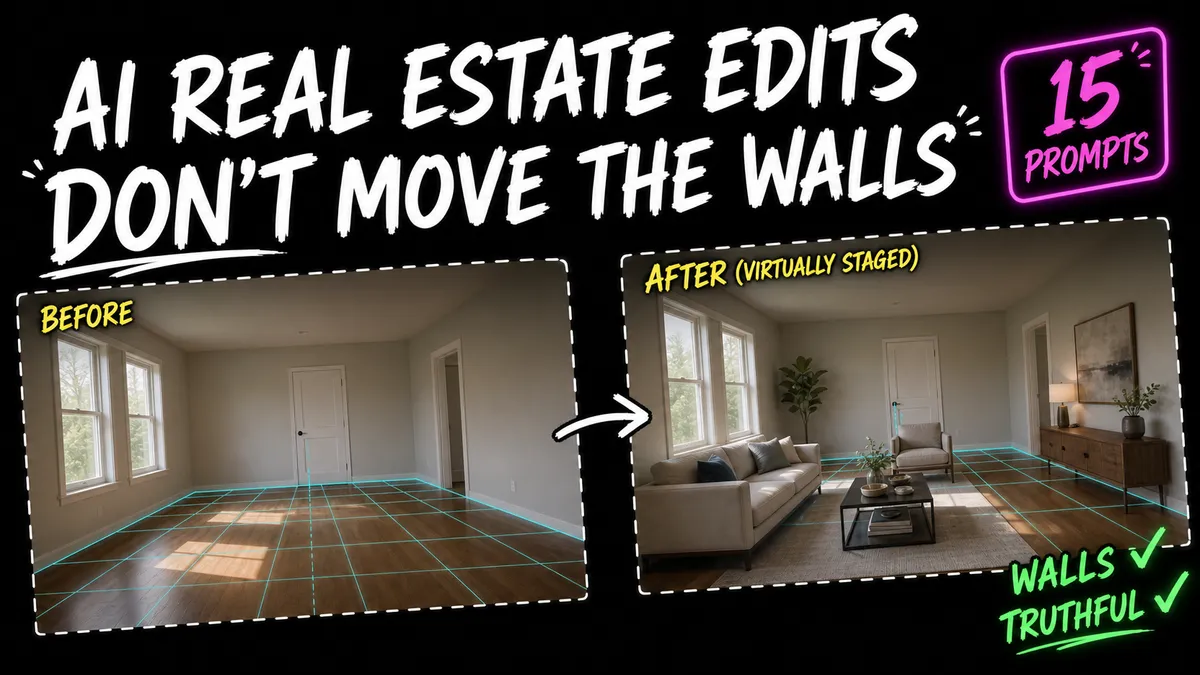
6. Stage an empty living room
Use the supplied reference image for this AI real estate photo editing prompts task.

GOAL:
Add appropriately scaled sofa, chairs, rug, table, and restrained decor without moving openings, fixtures, or camera.

PRESERVE / REQUIRE:
- all walls, windows, doors, ceilings, floors, built-ins, fixtures, views, room dimensions, camera position, lens perspective, and permanent property condition
- correct furniture scale, consistent vanishing points, realistic floor contact, plausible daylight, and disclosed staging that does not hide defects
- the requested composition, original aspect ratio when editing, and no unrequested objects

Return one polished stage an empty living room variation. Exclude watermarks, fake signatures, fabricated claims, and unreadable decorative text.
7. Stage an empty bedroom
Use the supplied reference image for this AI real estate photo editing prompts task.

GOAL:
Add a realistically sized bed, side tables, lamps, and simple textiles with clear door and window circulation.

PRESERVE / REQUIRE:
- all walls, windows, doors, ceilings, floors, built-ins, fixtures, views, room dimensions, camera position, lens perspective, and permanent property condition
- correct furniture scale, consistent vanishing points, realistic floor contact, plausible daylight, and disclosed staging that does not hide defects
- the requested composition, original aspect ratio when editing, and no unrequested objects

Return one polished stage an empty bedroom variation. Exclude watermarks, fake signatures, fabricated claims, and unreadable decorative text.
8. Stage a home office
Use the supplied reference image for this AI real estate photo editing prompts task.

GOAL:
Add desk, chair, task light, and limited storage without hiding outlets, doors, windows, radiators, or room condition.

PRESERVE / REQUIRE:
- all walls, windows, doors, ceilings, floors, built-ins, fixtures, views, room dimensions, camera position, lens perspective, and permanent property condition
- correct furniture scale, consistent vanishing points, realistic floor contact, plausible daylight, and disclosed staging that does not hide defects
- the requested composition, original aspect ratio when editing, and no unrequested objects

Return one polished stage a home office variation. Exclude watermarks, fake signatures, fabricated claims, and unreadable decorative text.
9. Preview wall paint
Use the supplied reference image for this AI real estate photo editing prompts task.

GOAL:
Change only painted wall color while preserving texture, trim, ceiling, fixtures, flooring, light, and shadows.

PRESERVE / REQUIRE:
- all walls, windows, doors, ceilings, floors, built-ins, fixtures, views, room dimensions, camera position, lens perspective, and permanent property condition
- correct furniture scale, consistent vanishing points, realistic floor contact, plausible daylight, and disclosed staging that does not hide defects
- the requested composition, original aspect ratio when editing, and no unrequested objects

Return one polished preview wall paint variation. Exclude watermarks, fake signatures, fabricated claims, and unreadable decorative text.
10. Preview cabinet color
Use the supplied reference image for this AI real estate photo editing prompts task.

GOAL:
Change only cabinet-front finish while preserving layout, counters, backsplash, appliances, hardware position, and condition.

PRESERVE / REQUIRE:
- all walls, windows, doors, ceilings, floors, built-ins, fixtures, views, room dimensions, camera position, lens perspective, and permanent property condition
- correct furniture scale, consistent vanishing points, realistic floor contact, plausible daylight, and disclosed staging that does not hide defects
- the requested composition, original aspect ratio when editing, and no unrequested objects

Return one polished preview cabinet color variation. Exclude watermarks, fake signatures, fabricated claims, and unreadable decorative text.
11. Add simple curb appeal
Use the supplied reference image for this AI real estate photo editing prompts task.

GOAL:
Preview movable planters and a clean doormat only; do not change landscaping, facade, driveway, roof, or neighboring property.

PRESERVE / REQUIRE:
- all walls, windows, doors, ceilings, floors, built-ins, fixtures, views, room dimensions, camera position, lens perspective, and permanent property condition
- correct furniture scale, consistent vanishing points, realistic floor contact, plausible daylight, and disclosed staging that does not hide defects
- the requested composition, original aspect ratio when editing, and no unrequested objects

Return one polished add simple curb appeal variation. Exclude watermarks, fake signatures, fabricated claims, and unreadable decorative text.
12. Remove a parked movable vehicle
Use the supplied reference image for this AI real estate photo editing prompts task.

GOAL:
Remove only the named vehicle if permitted, rebuilding visible pavement and background without altering the property.

PRESERVE / REQUIRE:
- all walls, windows, doors, ceilings, floors, built-ins, fixtures, views, room dimensions, camera position, lens perspective, and permanent property condition
- correct furniture scale, consistent vanishing points, realistic floor contact, plausible daylight, and disclosed staging that does not hide defects
- the requested composition, original aspect ratio when editing, and no unrequested objects

Return one polished remove a parked movable vehicle variation. Exclude watermarks, fake signatures, fabricated claims, and unreadable decorative text.
13. Clean a pool surface
Use the supplied reference image for this AI real estate photo editing prompts task.

GOAL:
Reduce floating leaves only while preserving pool shape, waterline, decking, equipment, reflections, and visible condition.

PRESERVE / REQUIRE:
- all walls, windows, doors, ceilings, floors, built-ins, fixtures, views, room dimensions, camera position, lens perspective, and permanent property condition
- correct furniture scale, consistent vanishing points, realistic floor contact, plausible daylight, and disclosed staging that does not hide defects
- the requested composition, original aspect ratio when editing, and no unrequested objects

Return one polished clean a pool surface variation. Exclude watermarks, fake signatures, fabricated claims, and unreadable decorative text.
14. Create a disclosed renovation concept
Use the supplied reference image for this AI real estate photo editing prompts task.

GOAL:
Visualize specified non-structural finishes as a clearly labeled concept without presenting them as current property condition.

PRESERVE / REQUIRE:
- all walls, windows, doors, ceilings, floors, built-ins, fixtures, views, room dimensions, camera position, lens perspective, and permanent property condition
- correct furniture scale, consistent vanishing points, realistic floor contact, plausible daylight, and disclosed staging that does not hide defects
- the requested composition, original aspect ratio when editing, and no unrequested objects

Return one polished create a disclosed renovation concept variation. Exclude watermarks, fake signatures, fabricated claims, and unreadable decorative text.
15. Build a consistent listing set
Use the supplied reference image for this AI real estate photo editing prompts task.

GOAL:
Apply the same neutral exposure, white balance, vertical correction, and restrained clarity across every room without redesign.

PRESERVE / REQUIRE:
- all walls, windows, doors, ceilings, floors, built-ins, fixtures, views, room dimensions, camera position, lens perspective, and permanent property condition
- correct furniture scale, consistent vanishing points, realistic floor contact, plausible daylight, and disclosed staging that does not hide defects
- the requested composition, original aspect ratio when editing, and no unrequested objects

Return one polished build a consistent listing set variation. Exclude watermarks, fake signatures, fabricated claims, and unreadable decorative text.
A production workflow built for AI real estate photo editing prompts
1. Archive the evidence before editing
Keep level wide-angle listing photos with visible corners, windows, doors, floors, and fixed fixtures untouched and give it a clear filename. In a separate note, record all walls, windows, doors, ceilings, floors, built-ins, fixtures, views, room dimensions, camera position, lens perspective, and permanent property condition. This turns subjective review into a comparison task. The preservation pattern in AI interior design prompts can be adapted to the exact source used here.
2. Test the clearest use case first
Start with declutter loose personal items, correct vertical lines, balance interior exposure. Choose the example closest to the real deliverable, then change only the scene or presentation requested by that template. Do not combine several templates until one baseline output passes the truth-lock review.
3. Review the physics that make this result believable
For AI real estate photo editing prompts, inspect correct furniture scale, consistent vanishing points, realistic floor contact, plausible daylight, and disclosed staging that does not hide defects. Zoomed-in polish cannot rescue a wrong silhouette, implausible contact point, changed face, false room geometry, or misleading product relationship. Reject structural errors before spending time on color and styling.
4. Finish exact communication outside the generator
Names, prices, measurements, credentials, ingredients, logos, legal copy, and small labels deserve a separate verification pass. Generate a clean composition and enough negative space, then place critical wording in a layout tool where spelling, contrast, and alignment can be controlled.
5. Stress-test a second delivery context
Use add simple curb appeal, remove a parked movable vehicle, clean a pool surface as reminders that the same concept may be viewed in another crop, device, audience, or channel. Inspect the full-resolution file for defects, then inspect the actual card, thumbnail, feed, listing, print, or profile size for hierarchy and legibility.
6. Preserve the decision trail
For every accepted AI real estate photo editing prompts result, save the source filename, exact prompt, model, date, settings, chosen output, rejected issue, and manual corrections. That record makes a later update reproducible instead of forcing the team to reverse-engineer an image.
AI real estate photo editing prompts: common failures and targeted fixes
| Failure in this task | Likely cause | Better correction |
|---|---|---|
| The result no longer preserves all walls, windows, doors, ceilings, floors, built-ins, fixtures, views, room dimensions, camera position, lens perspective, and permanent property condition | The brief described the new look but never made the source facts non-negotiable | Paste the truth-lock sentence before the style request and compare every output side by side |
| The concept does not help real-estate agents, photographers, property managers, stagers, and sellers | The model received visual adjectives without a real viewer or decision | State the audience, placement, message, and one action the visual should support |
| The scene feels physically wrong | The request omitted correct furniture scale, consistent vanishing points, realistic floor contact, plausible daylight, and disclosed staging that does not hide defects | Add camera, scale, light, contact, material, and perspective constraints that apply to this source |
| A required label or statement is nearly correct | Lettering was generated as image texture rather than typeset information | Reserve a clean text zone and place verified wording in a layout editor |
| Later versions drift away from the approved source | A flawed generated output was repeatedly used as the next reference | Return to the last verified source and apply one narrowly described change |
| The output looks impressive but implies something untrue | Creative freedom was not separated from factual presentation | Remove the unsupported cue and label generated, reconstructed, staged, or illustrative content when relevant |
Internal resources for this workflow
- AI interior design prompts
- GPT Image 2 preservation guide
- rooftop penthouse prompt
- storm portrait sky workflow
Each link above addresses a nearby task in the AI real estate photo editing prompts process: source preservation, a model-specific workflow, or a ready-made prompt example. Use the relevant link at the point where the reader needs it instead of treating internal links as an unrelated recommendation block.
Rights and truthful use for AI real estate photo editing prompts
Keep originals, disclose virtual staging, and follow the applicable MLS, advertising, and consumer-protection rules. Never remove damage, utility equipment, neighboring structures, or other material facts.
Before release, a human reviewer should check permissions, licensing, trademarks, accessibility, representation, and every factual implication specific to improve or stage listing photos while keeping the property truthful and structurally unchanged. The model can produce a draft; responsibility for the published claim remains with the person or organization using it.
Final AI real estate photo editing prompts quality check
- Does the image clearly improve or stage listing photos while keeping the property truthful and structurally unchanged?
- Does it still preserve all walls, windows, doors, ceilings, floors, built-ins, fixtures, views, room dimensions, camera position, lens perspective, and permanent property condition?
- Does the rendering show correct furniture scale, consistent vanishing points, realistic floor contact, plausible daylight, and disclosed staging that does not hide defects?
- Are names, labels, numbers, logos, credentials, prices, and claims verified?
- Are key edges and repeated details intact at 100% zoom?
- Does the hierarchy survive the real aspect ratio and smallest display size?
- Would a reasonable viewer understand what is generated, edited, staged, restored, or illustrative?
- Has the rights holder and a relevant human reviewer approved the final use?
Final answer
Effective AI real estate photo editing prompts make the requested change easy to see and the protected facts easy to audit. Pick the closest template, replace every placeholder with the real source and delivery details, run one focused generation, and reject any output that weakens the truth locks. That disciplined loop is more reusable than chasing a longer list of aesthetic adjectives.
Frequently asked questions
What should a good AI real estate photo editing prompt include?
Which AI image model should I use for AI real estate photo editing prompts?
Why does the AI change details I did not ask it to change?
Should I generate important text inside the image?
How many variations should I create?
Can I use the generated result commercially?
Sources and further reading
- OpenAI Developers: GPT Image 2 model documentation — https://developers.openai.com/api/docs/models/gpt-image-2
- OpenAI Developers: Image generation and editing guide — https://developers.openai.com/api/docs/guides/image-generation
- Google AI for Developers: Gemini image generation and editing — https://ai.google.dev/gemini-api/docs/image-generation
- Adobe: The Ultimate Guide to Firefly 2026 — https://www.adobe.com/content/dam/cc/tnt/emea/intl1202/Firefly_Prompt_Guide_2026_EN.pdf
- NorthstarMLS: Virtual Staging and AI-Enhanced Images Best Practice (2026) — https://northstarmls.com/wp-content/uploads/2026/06/Virtual-Stage-Best-Practice.pdf