Editable📸 INPUT REFERENCE: Use the uploaded photo as the base —
preserve the subject's core facial identity, bone structure,
eye shape, and distinguishing features precisely so the result
remains clearly recognizable as the same person
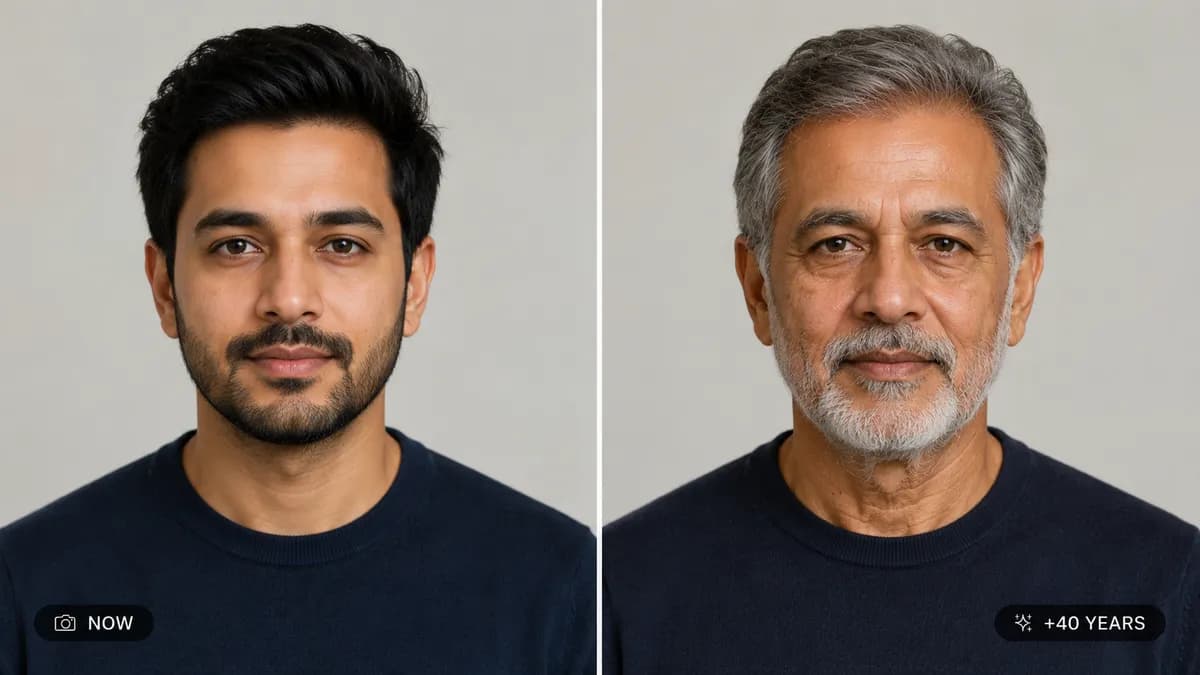
⏳ AGE TRANSFORMATION TASK: Adjust the subject's apparent age to
the target specified by the user (e.g. "show me 20 years older,"
"show me as a child around age 8," "show me at age 60"). Apply
age-accurate changes appropriate to the direction requested
👴 AGING UP DETAIL: Realistically add age-appropriate skin
texture changes — natural fine lines, soft skin laxity, gradual
hair greying or thinning consistent with their hair type, subtle
changes in facial volume — without exaggeration or caricature
👶 AGING DOWN DETAIL: Realistically soften facial features into
authentic youthful proportions — fuller cheeks, smoother skin,
proportionally larger eyes relative to face size, child-appropriate
hair texture — based on real human developmental patterns
🧬 GENETIC CONSISTENCY: Ensure the aged result still shares clear
facial DNA with the original photo — same nose shape, same eye
shape and spacing, same smile structure — so it looks like a
believable past or future version of the same real person
💡 LIGHTING CONSISTENCY: Maintain the original lighting direction,
color temperature and background exactly as in the source photo
🖌️ STYLE: Photorealistic age transformation — final result must
look like an authentic photograph of that life stage, never a
cartoonish or exaggerated filter
🚫 IDENTITY CORE PRESERVATION: Never change the person's fundamental
identity, ethnicity, or core facial geometry — only age-related
characteristics shift
📐 ASPECT RATIO: Preserve the original photo's exact aspect
ratio and framing