Key instructions to preserve
📸 INPUT REFERENCE: Use the uploaded photo as the base — preserve the subject's exact face, facial structure, skin tone, hair, clothing, pose and background precisely as they appear in the original 👁️ EYE CORRECTION TAS
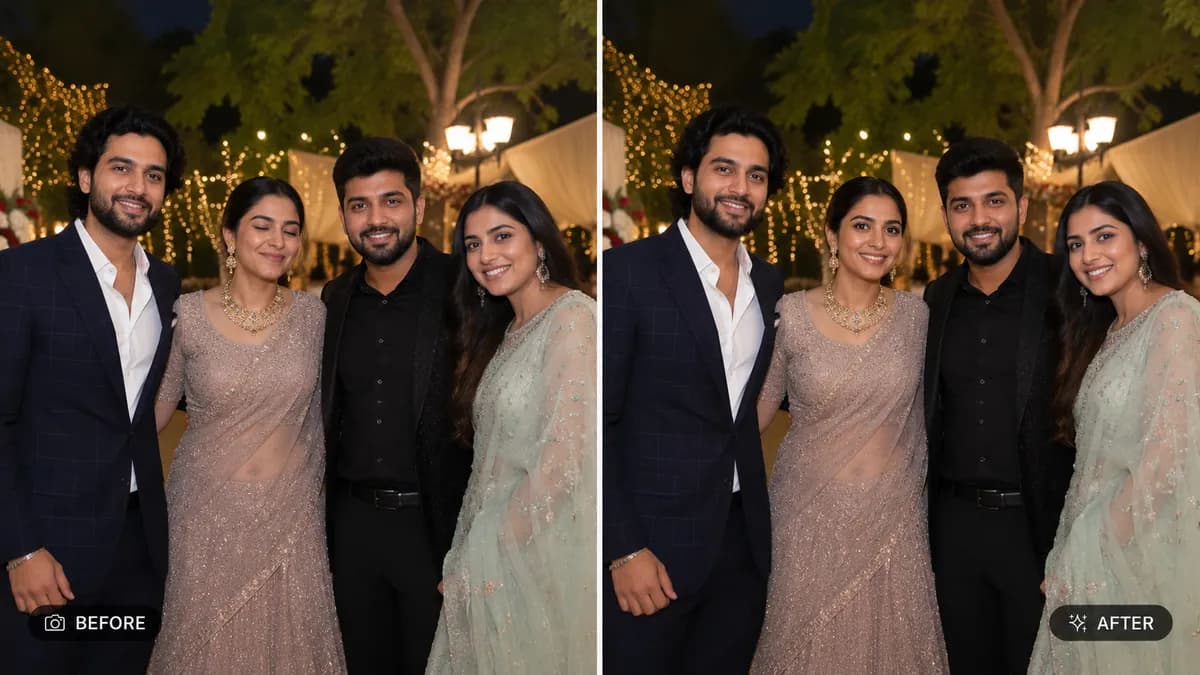
📸 INPUT REFERENCE: Use the uploaded photo as the base — preserve the subject's exact face, facial structure, skin tone, hair, clothing, pose and background precisely as they appear in the original 👁️ EYE CORRECTION TASK: If the subject's eyes are closed, mid-blink, or partially shut, naturally open them to a relaxed, authentic open-eye expression — eye shape, color, eyelid crease, and gaze direction must match the subject's real eyes exactly, as if captured at the perfect moment 😐 EXPRESSION REFINEMENT: If the expression looks awkward, overly forced, or mid-transition (caught between expressions), adjust it into a natural, relaxed expression consistent with the subject's face and the context of the photo — without inventing a different emotion than what the moment suggests 🧠 ANATOMICAL ACCURACY: Ensure corrected eyes and expression follow the subject's real facial muscle structure — natural crow's feet, cheek movement, and lip position consistent with a genuine, un-posed expression 💡 LIGHTING CONSISTENCY: Maintain the exact original lighting direction, catchlight position in the eyes, and shadow falloff across the corrected face 🖌️ STYLE: Photorealistic correction — final result must look like a single, naturally captured photograph at the ideal moment, never artificial or uncanny 🚫 IDENTITY PRESERVATION: Never alter eye shape, eye color, face structure, or any other identity feature — only the moment-specific expression is corrected 📐 ASPECT RATIO: Preserve the original photo's exact aspect ratio and framing

0 people have copied this prompt
Fix Closed Eyes or Bad Expression in Photo is a transformation prompt for GPT Image 2, composed for a 16:9 image. 📸 INPUT REFERENCE: Use the uploaded photo as the base — preserve the subject's exact face, facial structure, skin tone, hair, clothing, pose and background precisely as they appear in the original 👁️ EYE CORRECTION TAS
📸 INPUT REFERENCE: Use the uploaded photo as the base — preserve the subject's exact face, facial structure, skin tone, hair, clothing, pose and background precisely as they appear in the original 👁️ EYE CORRECTION TAS
Keep the prompt structure, then replace the main subject, action, or environment in "📸 INPUT REFERENCE: Use the uploaded photo as the base — preserve the subject's exact face, facial structure, skin tone, hair, clothing, pose and back...".
Adjust one visual signal at a time, such as "fix closed eyes photo", "open eyes ai editor", "blinking photo fix", "expression correction ai", so you can identify which instruction changes the result.
Use the wide frame to establish the environment, place supporting details around the subject, and maintain a clear focal point.
Use one clear reference image and retain the identity-lock instructions when changing clothing, lighting, background, or camera direction.
Use direct natural-language edits after the first generation. State what must remain unchanged before describing the single element you want to revise.
Judge the result by how clearly it communicates the intended transformation direction while keeping the subject, environment, and visual treatment consistent.
Three simple steps to generate your AI image.
Click the "Copy Full Prompt" button above to copy the entire prompt text to your clipboard instantly.
Open your preferred image generator and paste the prompt into the text input. You're ready to create.
Hit generate and watch the magic happen. Tweak the prompt parameters to make it your own.