Key instructions to preserve
📸 INPUT REFERENCE: Use the uploaded photo as the base — preserve the subject's exact face, facial features, skin tone, clothing, hairstyle and background precisely as they appear in the original 🧍 POSTURE CORRECTION TA
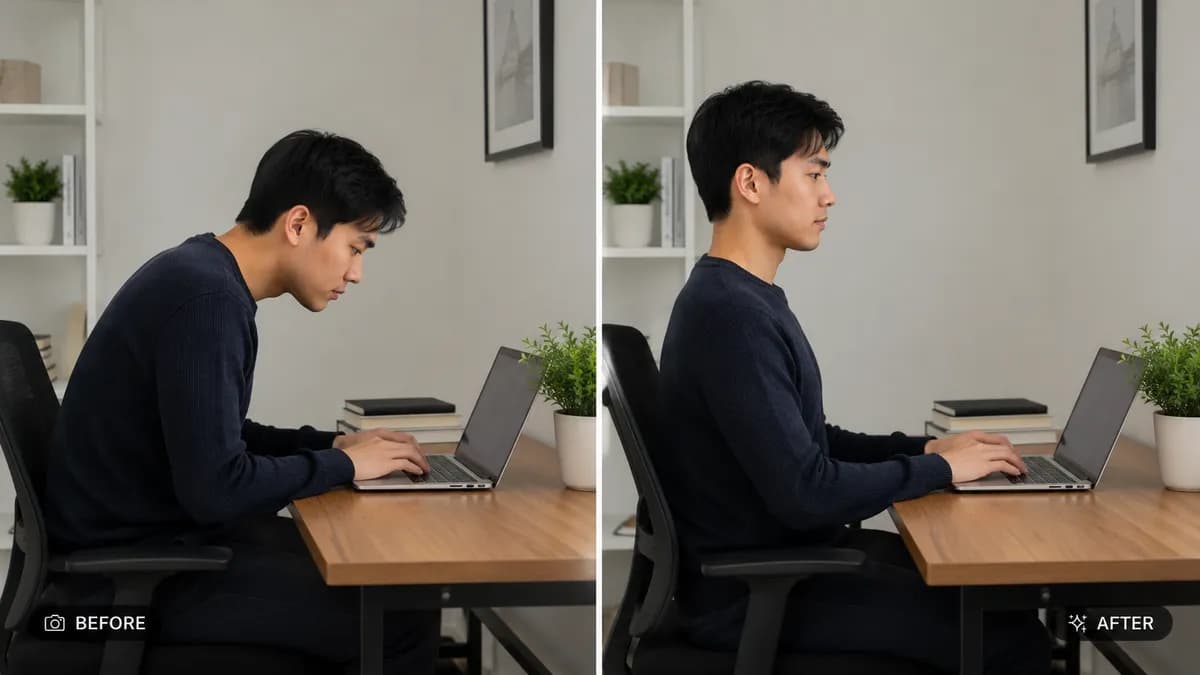
📸 INPUT REFERENCE: Use the uploaded photo as the base — preserve the subject's exact face, facial features, skin tone, clothing, hairstyle and background precisely as they appear in the original 🧍 POSTURE CORRECTION TASK: Naturally straighten slouched shoulders, align a hunched spine into a confident upright posture, and adjust head position to sit naturally balanced over the shoulders — corrections should look like the subject's own natural good posture, not an exaggerated or stiff pose ⚖️ BODY PROPORTION INTEGRITY: Maintain the subject's real body proportions, height, and build exactly — posture correction must never thin, reshape, or alter actual body size or weight 🧠 NATURAL MOVEMENT LOGIC: Ensure corrected posture follows realistic human anatomy — natural shoulder rotation, neck angle, and spine curve consistent with how a real person would naturally stand or sit confidently 🧵 CLOTHING ADAPTATION: Adjust how clothing folds and drapes to realistically follow the corrected posture — fabric must shift naturally with the new body alignment, not remain frozen in the original slouched shape 💡 LIGHTING CONSISTENCY: Maintain the original lighting direction, shadow placement and color temperature across the corrected pose 🖌️ STYLE: Photorealistic correction — final result must look like a single, naturally captured photograph, not a digitally warped or distorted image 🚫 IDENTITY PRESERVATION: Never alter the subject's face, body shape, or weight — posture alignment only 📐 ASPECT RATIO: Preserve the original photo's exact aspect ratio and framing

0 people have copied this prompt
Fix Posture and Improve Confidence in Photo is a transformation prompt for GPT Image 2, composed for a 16:9 image. 📸 INPUT REFERENCE: Use the uploaded photo as the base — preserve the subject's exact face, facial features, skin tone, clothing, hairstyle and background precisely as they appear in the original 🧍 POSTURE CORRECTION TA
📸 INPUT REFERENCE: Use the uploaded photo as the base — preserve the subject's exact face, facial features, skin tone, clothing, hairstyle and background precisely as they appear in the original 🧍 POSTURE CORRECTION TA
Keep the prompt structure, then replace the main subject, action, or environment in "📸 INPUT REFERENCE: Use the uploaded photo as the base — preserve the subject's exact face, facial features, skin tone, clothing, hairstyle and backgr...".
Adjust one visual signal at a time, such as "posture correction ai", "fix slouching photo", "straighten posture photo editor", "ai posture fix", so you can identify which instruction changes the result.
Use the wide frame to establish the environment, place supporting details around the subject, and maintain a clear focal point.
Use one clear reference image and retain the identity-lock instructions when changing clothing, lighting, background, or camera direction.
Use direct natural-language edits after the first generation. State what must remain unchanged before describing the single element you want to revise.
Judge the result by how clearly it communicates the intended transformation direction while keeping the subject, environment, and visual treatment consistent.
Three simple steps to generate your AI image.
Click the "Copy Full Prompt" button above to copy the entire prompt text to your clipboard instantly.
Open your preferred image generator and paste the prompt into the text input. You're ready to create.
Hit generate and watch the magic happen. Tweak the prompt parameters to make it your own.