15 AI Old Photo Restoration Prompts: Repair, Sharpen, and Colorize Without Changing Faces (2026)
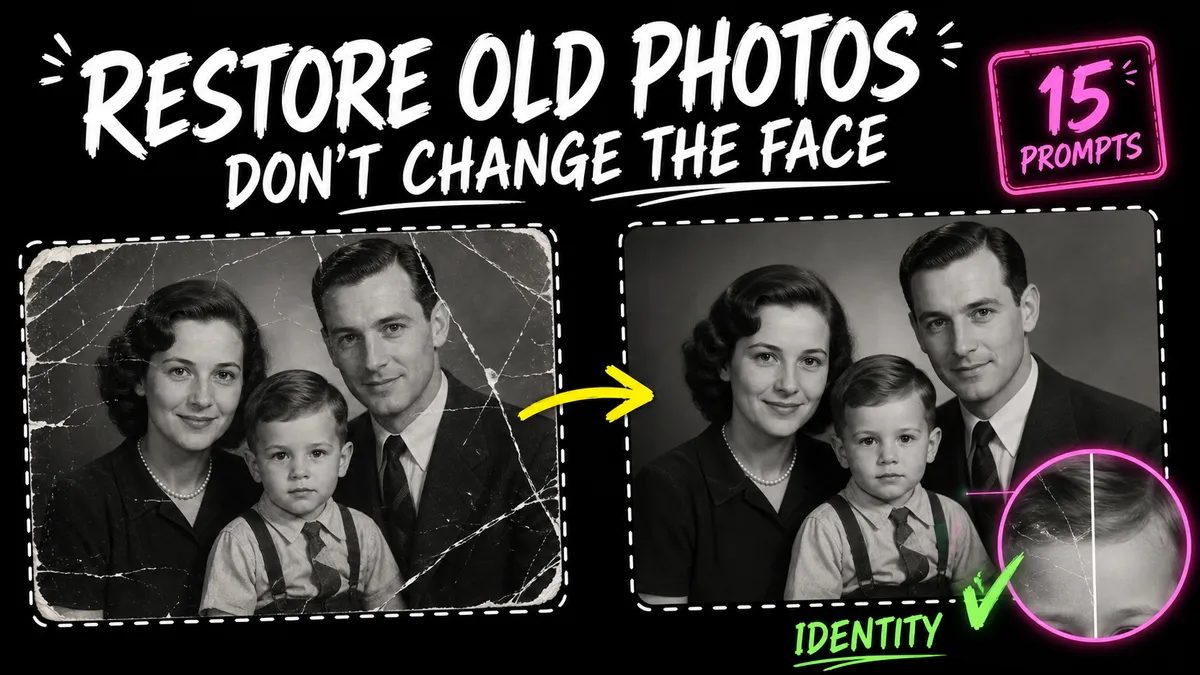
Repair scratches, fading, blur, tears, and missing areas with 15 AI old-photo restoration prompts that preserve identity and historical character.
On this page 34 sections
Key takeaways
Scan the source at the best available resolution, describe only the visible damage, and lock every face, expression, garment, object, and period detail. Restore structure first, then colorize in a separate pass. Keep the untouched scan and clearly label any reconstructed or colorized version.
Repair scratches, fading, blur, tears, and missing areas with 15 AI old-photo restoration prompts that preserve identity and historical character.
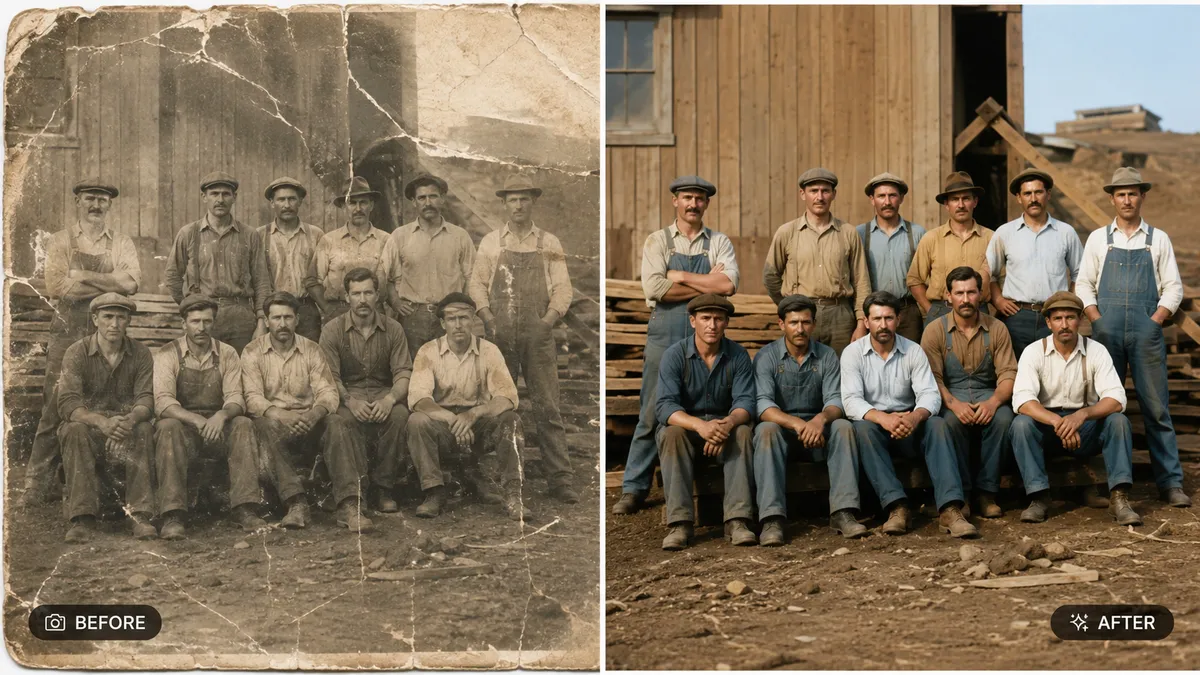
AI old photo restoration prompts should begin with the real production decision, not a pile of style adjectives. This guide is written for families, archivists, historians, genealogists, and photo editors. The 15 templates below are designed to repair visible damage while protecting identity, era, composition, and documentary value.
> Direct answer: Begin with the highest-resolution scan available, captured flat and without aggressive phone filters. Define the single decision this image must communicate, explicitly protect the exact people, facial structure, expressions, pose, clothing design, background layout, crop, photographic grain, and period-specific details, and judge the result against the source before it is published or used commercially.
TL;DR
Scan the source at the best available resolution, describe only the visible damage, and lock every face, expression, garment, object, and period detail. Restore structure first, then colorize in a separate pass. Keep the untouched scan and clearly label any reconstructed or colorized version.
Why AI old photo restoration prompts need a dedicated workflow in 2026
For AI old photo restoration prompts, a visually attractive output can still be unusable when the system changes facts the viewer assumes are real. The critical risk in this topic is not simply a weak aesthetic; it is losing the exact people, facial structure, expressions, pose, clothing design, background layout, crop, photographic grain, and period-specific details. A useful brief therefore separates the requested creative change from the evidence that must survive unchanged.
Current tools can follow natural-language edits and references, yet their own documentation still treats generation as iterative. For this task, that means planning around damage repair that follows surrounding texture, restrained sharpening, plausible tonal range, and historically cautious color choices. When a pixel, measurement, spelling, logo, or regulated statement must be exact, finish that element with a conventional editing, layout, vector, or measurement tool.
A five-part formula for AI old photo restoration prompts
Build each request in this order:
- Source for this task: state that you are providing the highest-resolution scan available, captured flat and without aggressive phone filters.
- Useful outcome: describe how the result will help families, archivists, historians, genealogists, and photo editors.
- Truth locks: copy the non-negotiable list—the exact people, facial structure, expressions, pose, clothing design, background layout, crop, photographic grain, and period-specific details.
- Visual behavior: require damage repair that follows surrounding texture, restrained sharpening, plausible tonal range, and historically cautious color choices.
- Final delivery: name the crop, safe areas, variation count, exclusions, and real publishing context.
This order makes omissions visible. If a requested detail is absent from the source and the brief, the generator must guess; in AI old photo restoration prompts, that guess can quietly become the most noticeable part of the image.
AI old photo restoration prompts preflight
Before opening a generator, collect and verify:
- the highest-resolution scan available, captured flat and without aggressive phone filters;
- permission for every supplied likeness, product, artwork, room, or private location;
- the exact facts the viewer could reasonably interpret as true;
- the final aspect ratio and smallest display size;
- one primary visual decision for the first pass;
- a side-by-side review method for the exact people, facial structure, expressions, pose, clothing design, background layout, crop, photographic grain, and period-specific details; and
- a non-generative fallback for precision typography, vectors, dimensions, or compliance details.
15 copy-ready AI old photo restoration prompts
1. Remove dust and small scratches
Use the supplied reference image for this AI old photo restoration prompts task.

GOAL:
Remove only visible dust spots and thin scratches, reconstructing each mark from the nearest intact grain and tone.

PRESERVE / REQUIRE:
- the exact people, facial structure, expressions, pose, clothing design, background layout, crop, photographic grain, and period-specific details
- damage repair that follows surrounding texture, restrained sharpening, plausible tonal range, and historically cautious color choices
- the requested composition, original aspect ratio when editing, and no unrequested objects

Return one polished remove dust and small scratches variation. Exclude watermarks, fake signatures, fabricated claims, and unreadable decorative text.
2. Repair a torn corner
Use the supplied reference image for this AI old photo restoration prompts task.

GOAL:
Reconstruct only the torn corner using adjacent background texture and repeated architectural or fabric cues; do not invent a new subject.

PRESERVE / REQUIRE:
- the exact people, facial structure, expressions, pose, clothing design, background layout, crop, photographic grain, and period-specific details
- damage repair that follows surrounding texture, restrained sharpening, plausible tonal range, and historically cautious color choices
- the requested composition, original aspect ratio when editing, and no unrequested objects

Return one polished repair a torn corner variation. Exclude watermarks, fake signatures, fabricated claims, and unreadable decorative text.
3. Reduce fading
Use the supplied reference image for this AI old photo restoration prompts task.

GOAL:
Restore balanced black, white, and midtone density while retaining the original film contrast and highlight roll-off.

PRESERVE / REQUIRE:
- the exact people, facial structure, expressions, pose, clothing design, background layout, crop, photographic grain, and period-specific details
- damage repair that follows surrounding texture, restrained sharpening, plausible tonal range, and historically cautious color choices
- the requested composition, original aspect ratio when editing, and no unrequested objects

Return one polished reduce fading variation. Exclude watermarks, fake signatures, fabricated claims, and unreadable decorative text.
4. Repair fold lines
Use the supplied reference image for this AI old photo restoration prompts task.

GOAL:
Remove the paper fold line and rebuild the interrupted texture without smoothing faces, clothing, or printed detail.

PRESERVE / REQUIRE:
- the exact people, facial structure, expressions, pose, clothing design, background layout, crop, photographic grain, and period-specific details
- damage repair that follows surrounding texture, restrained sharpening, plausible tonal range, and historically cautious color choices
- the requested composition, original aspect ratio when editing, and no unrequested objects

Return one polished repair fold lines variation. Exclude watermarks, fake signatures, fabricated claims, and unreadable decorative text.
5. Sharpen a soft portrait
Use the supplied reference image for this AI old photo restoration prompts task.

GOAL:
Apply restrained detail recovery to the eyes, hair, and clothing edges without changing facial geometry or inventing pores.

PRESERVE / REQUIRE:
- the exact people, facial structure, expressions, pose, clothing design, background layout, crop, photographic grain, and period-specific details
- damage repair that follows surrounding texture, restrained sharpening, plausible tonal range, and historically cautious color choices
- the requested composition, original aspect ratio when editing, and no unrequested objects

Return one polished sharpen a soft portrait variation. Exclude watermarks, fake signatures, fabricated claims, and unreadable decorative text.
6. Restore a group photograph
Use the supplied reference image for this AI old photo restoration prompts task.

GOAL:
Repair damage across the print while keeping every person’s face, position, scale, gaze, and clothing unchanged.

PRESERVE / REQUIRE:
- the exact people, facial structure, expressions, pose, clothing design, background layout, crop, photographic grain, and period-specific details
- damage repair that follows surrounding texture, restrained sharpening, plausible tonal range, and historically cautious color choices
- the requested composition, original aspect ratio when editing, and no unrequested objects

Return one polished restore a group photograph variation. Exclude watermarks, fake signatures, fabricated claims, and unreadable decorative text.
7. Colorize a studio portrait
Use the supplied reference image for this AI old photo restoration prompts task.

GOAL:
Add conservative, era-plausible skin, hair, clothing, and backdrop colors while preserving luminance and film grain.

PRESERVE / REQUIRE:
- the exact people, facial structure, expressions, pose, clothing design, background layout, crop, photographic grain, and period-specific details
- damage repair that follows surrounding texture, restrained sharpening, plausible tonal range, and historically cautious color choices
- the requested composition, original aspect ratio when editing, and no unrequested objects

Return one polished colorize a studio portrait variation. Exclude watermarks, fake signatures, fabricated claims, and unreadable decorative text.
8. Colorize a military photograph
Use the supplied reference image for this AI old photo restoration prompts task.

GOAL:
Use historically cautious uniform and insignia colors, keeping every badge, seam, rank mark, and face unchanged.

PRESERVE / REQUIRE:
- the exact people, facial structure, expressions, pose, clothing design, background layout, crop, photographic grain, and period-specific details
- damage repair that follows surrounding texture, restrained sharpening, plausible tonal range, and historically cautious color choices
- the requested composition, original aspect ratio when editing, and no unrequested objects

Return one polished colorize a military photograph variation. Exclude watermarks, fake signatures, fabricated claims, and unreadable decorative text.
9. Repair water damage
Use the supplied reference image for this AI old photo restoration prompts task.

GOAL:
Reduce stained and mottled areas while preserving paper texture, tonal transitions, and all surviving image information.

PRESERVE / REQUIRE:
- the exact people, facial structure, expressions, pose, clothing design, background layout, crop, photographic grain, and period-specific details
- damage repair that follows surrounding texture, restrained sharpening, plausible tonal range, and historically cautious color choices
- the requested composition, original aspect ratio when editing, and no unrequested objects

Return one polished repair water damage variation. Exclude watermarks, fake signatures, fabricated claims, and unreadable decorative text.
10. Recover low contrast
Use the supplied reference image for this AI old photo restoration prompts task.

GOAL:
Increase local separation in faces and clothing without crushing shadows, clipping highlights, or applying a modern HDR look.

PRESERVE / REQUIRE:
- the exact people, facial structure, expressions, pose, clothing design, background layout, crop, photographic grain, and period-specific details
- damage repair that follows surrounding texture, restrained sharpening, plausible tonal range, and historically cautious color choices
- the requested composition, original aspect ratio when editing, and no unrequested objects

Return one polished recover low contrast variation. Exclude watermarks, fake signatures, fabricated claims, and unreadable decorative text.
11. Fix red or yellow color cast
Use the supplied reference image for this AI old photo restoration prompts task.

GOAL:
Neutralize only the aging-related cast while preserving the original photographic palette and print character.

PRESERVE / REQUIRE:
- the exact people, facial structure, expressions, pose, clothing design, background layout, crop, photographic grain, and period-specific details
- damage repair that follows surrounding texture, restrained sharpening, plausible tonal range, and historically cautious color choices
- the requested composition, original aspect ratio when editing, and no unrequested objects

Return one polished fix red or yellow color cast variation. Exclude watermarks, fake signatures, fabricated claims, and unreadable decorative text.
12. Restore a wedding portrait
Use the supplied reference image for this AI old photo restoration prompts task.

GOAL:
Repair scratches and fading, retain dress and suit details, and keep faces, hands, jewelry, flowers, and pose unchanged.

PRESERVE / REQUIRE:
- the exact people, facial structure, expressions, pose, clothing design, background layout, crop, photographic grain, and period-specific details
- damage repair that follows surrounding texture, restrained sharpening, plausible tonal range, and historically cautious color choices
- the requested composition, original aspect ratio when editing, and no unrequested objects

Return one polished restore a wedding portrait variation. Exclude watermarks, fake signatures, fabricated claims, and unreadable decorative text.
13. Restore handwritten text
Use the supplied reference image for this AI old photo restoration prompts task.

GOAL:
Improve legibility only where strokes remain visible; do not guess missing names, dates, or letters.

PRESERVE / REQUIRE:
- the exact people, facial structure, expressions, pose, clothing design, background layout, crop, photographic grain, and period-specific details
- damage repair that follows surrounding texture, restrained sharpening, plausible tonal range, and historically cautious color choices
- the requested composition, original aspect ratio when editing, and no unrequested objects

Return one polished restore handwritten text variation. Exclude watermarks, fake signatures, fabricated claims, and unreadable decorative text.
14. Prepare an archival master
Use the supplied reference image for this AI old photo restoration prompts task.

GOAL:
Create a clean restoration with original crop, border, grain, and monochrome tone retained for long-term comparison.

PRESERVE / REQUIRE:
- the exact people, facial structure, expressions, pose, clothing design, background layout, crop, photographic grain, and period-specific details
- damage repair that follows surrounding texture, restrained sharpening, plausible tonal range, and historically cautious color choices
- the requested composition, original aspect ratio when editing, and no unrequested objects

Return one polished prepare an archival master variation. Exclude watermarks, fake signatures, fabricated claims, and unreadable decorative text.
15. Create a labeled colorized copy
Use the supplied reference image for this AI old photo restoration prompts task.

GOAL:
Produce a separate colorized interpretation after restoration, preserving the restored structure and adding no new objects.

PRESERVE / REQUIRE:
- the exact people, facial structure, expressions, pose, clothing design, background layout, crop, photographic grain, and period-specific details
- damage repair that follows surrounding texture, restrained sharpening, plausible tonal range, and historically cautious color choices
- the requested composition, original aspect ratio when editing, and no unrequested objects

Return one polished create a labeled colorized copy variation. Exclude watermarks, fake signatures, fabricated claims, and unreadable decorative text.
A production workflow built for AI old photo restoration prompts
1. Archive the evidence before editing
Keep the highest-resolution scan available, captured flat and without aggressive phone filters untouched and give it a clear filename. In a separate note, record the exact people, facial structure, expressions, pose, clothing design, background layout, crop, photographic grain, and period-specific details. This turns subjective review into a comparison task. The preservation pattern in GPT Image 2 preservation workflow can be adapted to the exact source used here.
2. Test the clearest use case first
Start with remove dust and small scratches, repair a torn corner, reduce fading. Choose the example closest to the real deliverable, then change only the scene or presentation requested by that template. Do not combine several templates until one baseline output passes the truth-lock review.
3. Review the physics that make this result believable
For AI old photo restoration prompts, inspect damage repair that follows surrounding texture, restrained sharpening, plausible tonal range, and historically cautious color choices. Zoomed-in polish cannot rescue a wrong silhouette, implausible contact point, changed face, false room geometry, or misleading product relationship. Reject structural errors before spending time on color and styling.
4. Finish exact communication outside the generator
Names, prices, measurements, credentials, ingredients, logos, legal copy, and small labels deserve a separate verification pass. Generate a clean composition and enough negative space, then place critical wording in a layout tool where spelling, contrast, and alignment can be controlled.
5. Stress-test a second delivery context
Use fix red or yellow color cast, restore a wedding portrait, restore handwritten text as reminders that the same concept may be viewed in another crop, device, audience, or channel. Inspect the full-resolution file for defects, then inspect the actual card, thumbnail, feed, listing, print, or profile size for hierarchy and legibility.
6. Preserve the decision trail
For every accepted AI old photo restoration prompts result, save the source filename, exact prompt, model, date, settings, chosen output, rejected issue, and manual corrections. That record makes a later update reproducible instead of forcing the team to reverse-engineer an image.
AI old photo restoration prompts: common failures and targeted fixes
| Failure in this task | Likely cause | Better correction |
|---|---|---|
| The result no longer preserves the exact people, facial structure, expressions, pose, clothing design, background layout, crop, photographic grain, and period-specific details | The brief described the new look but never made the source facts non-negotiable | Paste the truth-lock sentence before the style request and compare every output side by side |
| The concept does not help families, archivists, historians, genealogists, and photo editors | The model received visual adjectives without a real viewer or decision | State the audience, placement, message, and one action the visual should support |
| The scene feels physically wrong | The request omitted damage repair that follows surrounding texture, restrained sharpening, plausible tonal range, and historically cautious color choices | Add camera, scale, light, contact, material, and perspective constraints that apply to this source |
| A required label or statement is nearly correct | Lettering was generated as image texture rather than typeset information | Reserve a clean text zone and place verified wording in a layout editor |
| Later versions drift away from the approved source | A flawed generated output was repeatedly used as the next reference | Return to the last verified source and apply one narrowly described change |
| The output looks impressive but implies something untrue | Creative freedom was not separated from factual presentation | Remove the unsupported cue and label generated, reconstructed, staged, or illustrative content when relevant |
Internal resources for this workflow
- GPT Image 2 preservation workflow
- face consistency guide
- document straightening prompt
- wedding photo color-grade prompt
Each link above addresses a nearby task in the AI old photo restoration prompts process: source preservation, a model-specific workflow, or a ready-made prompt example. Use the relevant link at the point where the reader needs it instead of treating internal links as an unrelated recommendation block.
Rights and truthful use for AI old photo restoration prompts
Treat restoration as interpretation, not proof. Preserve the untouched scan, record every edit, and label colorized or reconstructed versions when historical accuracy matters.
Before release, a human reviewer should check permissions, licensing, trademarks, accessibility, representation, and every factual implication specific to repair visible damage while protecting identity, era, composition, and documentary value. The model can produce a draft; responsibility for the published claim remains with the person or organization using it.
Final AI old photo restoration prompts quality check
- Does the image clearly repair visible damage while protecting identity, era, composition, and documentary value?
- Does it still preserve the exact people, facial structure, expressions, pose, clothing design, background layout, crop, photographic grain, and period-specific details?
- Does the rendering show damage repair that follows surrounding texture, restrained sharpening, plausible tonal range, and historically cautious color choices?
- Are names, labels, numbers, logos, credentials, prices, and claims verified?
- Are key edges and repeated details intact at 100% zoom?
- Does the hierarchy survive the real aspect ratio and smallest display size?
- Would a reasonable viewer understand what is generated, edited, staged, restored, or illustrative?
- Has the rights holder and a relevant human reviewer approved the final use?
Final answer
Effective AI old photo restoration prompts make the requested change easy to see and the protected facts easy to audit. Pick the closest template, replace every placeholder with the real source and delivery details, run one focused generation, and reject any output that weakens the truth locks. That disciplined loop is more reusable than chasing a longer list of aesthetic adjectives.
Frequently asked questions
What should a good AI old photo restoration prompt include?
Which AI image model should I use for AI old photo restoration prompts?
Why does the AI change details I did not ask it to change?
Should I generate important text inside the image?
How many variations should I create?
Can I use the generated result commercially?
Sources and further reading
- OpenAI Developers: GPT Image 2 model documentation — https://developers.openai.com/api/docs/models/gpt-image-2
- OpenAI Developers: Image generation and editing guide — https://developers.openai.com/api/docs/guides/image-generation
- Google AI for Developers: Gemini image generation and editing — https://ai.google.dev/gemini-api/docs/image-generation
- Adobe: The Ultimate Guide to Firefly 2026 — https://www.adobe.com/content/dam/cc/tnt/emea/intl1202/Firefly_Prompt_Guide_2026_EN.pdf
- ColorFLUX: A Structure-Color Decoupling Framework for Old Photo Colorization (2026) — https://arxiv.org/abs/2603.28162
- Structure-preserving Feature Alignment for Old Photo Colorization — https://arxiv.org/abs/2508.12570